

Start Your Virtual Smile Review Today
Your Smile Journey Starts From Home
Skip the waiting room and get expert orthodontic advice from the comfort of your couch. Our virtual Smile Review makes it easy to receive professional recommendations with no office visit required.
Whether you’re exploring cosmetic options or have a dental concern, we’ll guide you through the process step by step, with a 30-minute Zoom Smile Review available for those who want to talk through their goals first.
Step 1
Step 1: Take Your Photos
How to Take Photos for Your Virtual Consult
To give you the best advice, we’ll need a few clear photos of your teeth and smile. Ask a friend to help, or use your phone’s self-timer and good lighting.
Here’s what we need:
- Front smile (teeth together) Smile naturally with back teeth touching.
- Left side view Turn head slightly right, bite together.
- Right side view Turn head slightly left, bite together.
- Teeth apart (open bite) Open mouth slightly to show top/bottom spacing.
- Upper teeth (from below) Tilt head back to capture upper arch.
- Lower teeth (from above) Tilt head down to capture lower arch.
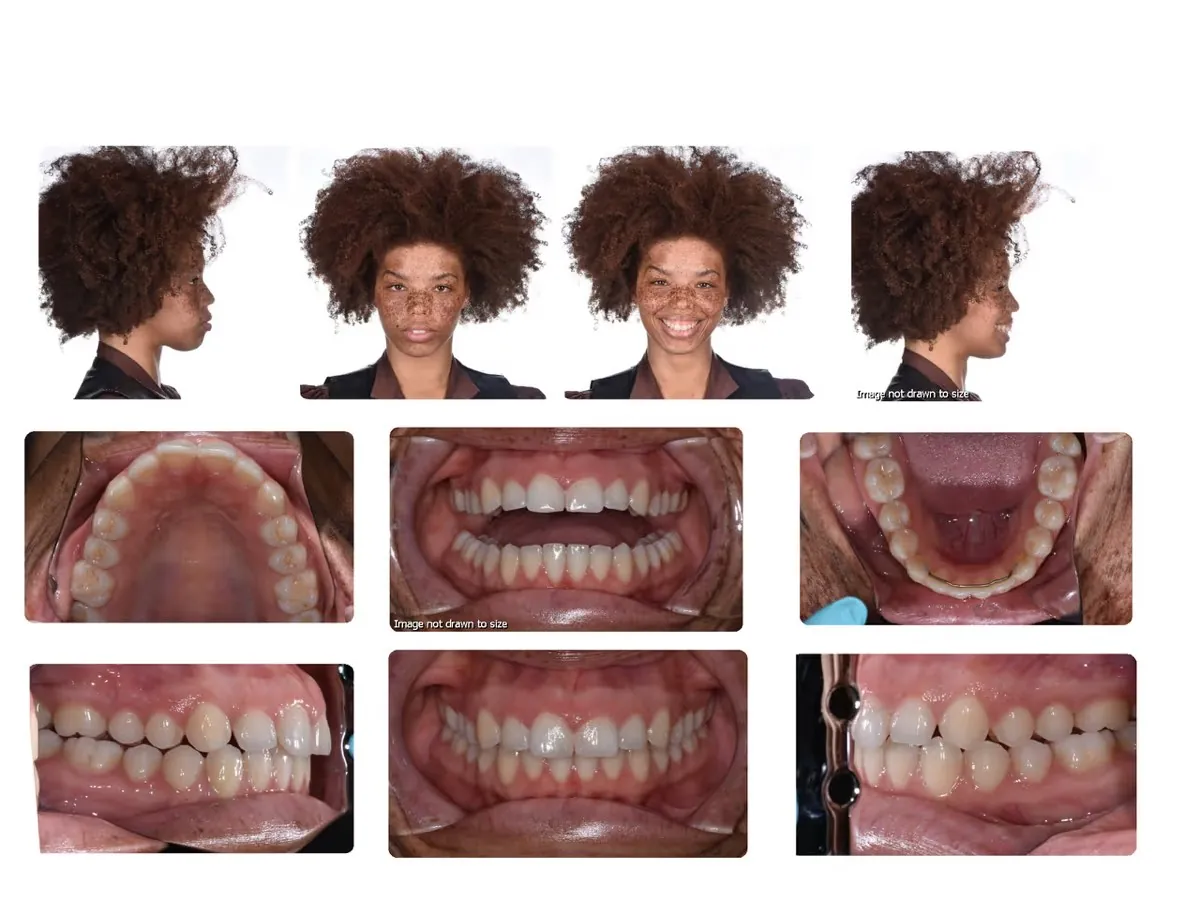
Tip: Use natural lighting and avoid filters. The clearer the photos, the more accurate our recommendations will be!
Step 2
Step 2: Submit Your Photos
Use the Form Below to Send Everything in One Place
We’ve made it easy to submit your photos and details securely, all in one step. Just fill out the form below in Step 4, upload your dental photos, and click submit.
Your privacy matters to us. All submissions are handled securely and reviewed only by our dental team.
Step 3
Step 3: Pay for Your Smile Review
Quick, Secure Payment with Stripe
Our virtual Smile Review fee is $350. This covers a thorough review of your case by our doctor and a personalized response with treatment options.
Powered by Stripe for fast, secure checkout
*If you are only interested in a price quote, you can skip this step.
$350
Virtual Smile Review Fee
Full Doctor Case Review & Customized Treatment Plan
- Doctor case evaluation & photo analysis
- Personalized treatment options & timeline
- Estimated cost breakdown
Step 4
Step 4: Fill & Submit Virtual Consult Request Form
Use the Form Below to Send Everything in One Place or Email Us at info@wallstreetortho.com.
Step 5
Step 5: What to Expect Next
Once we receive your photos and payment, our team will review everything carefully. You’ll receive a response within a few days, which may include:

- Personalized treatment recommendations
- A proposed timeline
- Cost estimates
- Next steps for scheduling an in-office visit (if needed)
Ready to Get Started?
Get expert dental insight without leaving home. Just submit your photos, pay online, and leave the rest to us.